Battery Charging Animation
FirehawkPersonalization
4.61.07K Reviews
- Version
- 1.4.12
- Installs
- 10.00M
- Age Rating
- Everyone
Screenshots
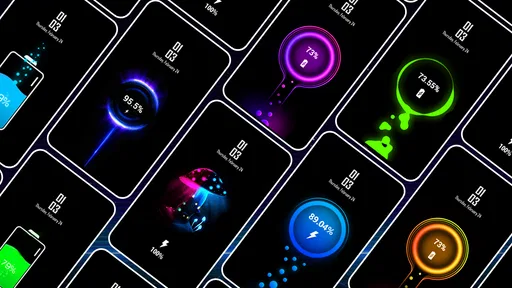
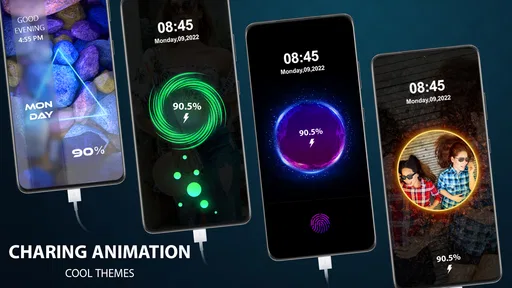
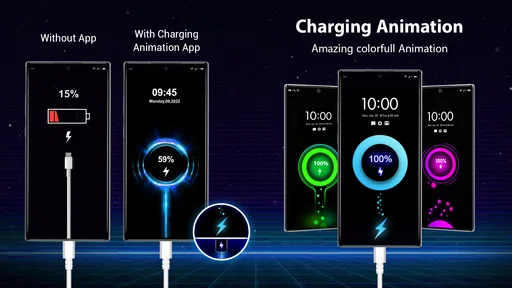
Our Review of Battery Charging Animation
 Analysis by Appyee
I judge a charging animation app less by how dramatic it looks in a preview and more by whether it fits naturally into the few seconds when I plug my phone in. Battery Charging Animation is a personalization app from Firehawk that turns that ordinary moment into a visual flourish. It is free to install, has a 4.6 average from around 217,000 ratings, and has passed 10 million installs. That kind of reach suggests plenty of people enjoy the idea, though a lively screen effect is still a matter of taste rather than a must-have phone feature.
What a network connection changes
The central appeal is the animation on the screen, not a social feed or a service that obviously needs you to stay connected throughout the day. In practical terms, I would think about the network mainly when first getting the app, browsing whatever choices it presents, or handling an update. Once you have settled on a look, the routine use case is simply connecting a charger and seeing the chosen effect. I would not install it expecting a constant stream of online content; the value is in making a familiar charging cue feel more personal.
That distinction matters if you have an unreliable connection. A weak signal can make browsing or downloading content less convenient, but it does not change the basic reason someone might want a charging animation. I’d choose a design while connected, test it at home, and then see whether the same setup behaves as expected in other places. This is a more useful trial than judging the app while commuting through patchy coverage.
Making the charging screen fit your routine
I’d treat the charging screen as a small part of a larger phone routine: the best animation is one I can recognize quickly, without making me linger over the display. I’d choose it with the places I charge in mind, then see how it feels at a desk and in a darker room. That everyday test also helps clarify when the app’s visual touch is useful—and when a simpler charging indicator is enough.
Personalizing the moment without overdoing it
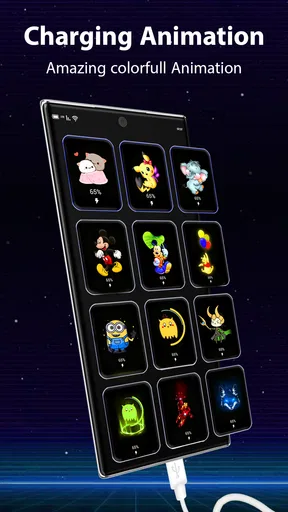
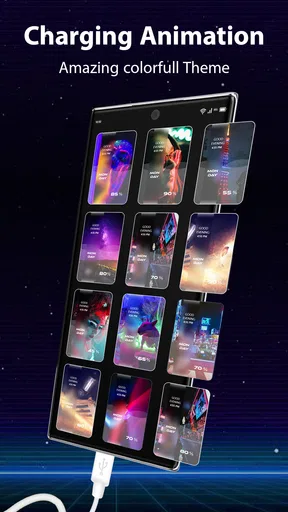
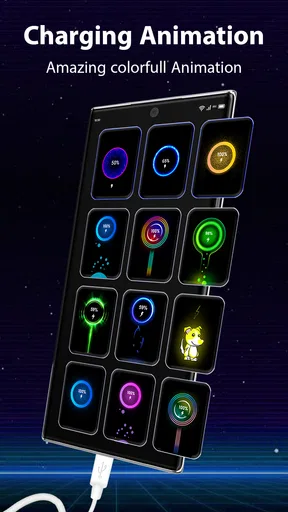
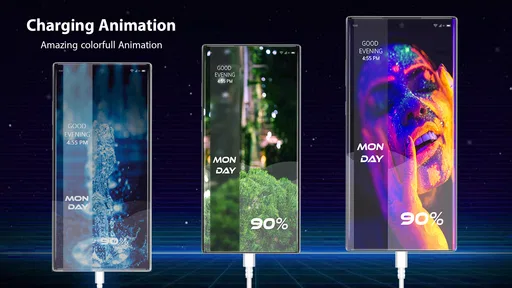
First off, what I love about the Battery Charging Animation app is the level of customization it offers. You can choose from a range of animations that suit your mood or style. Whether you prefer bright neon effects, calmer waves, or playful characters, the goal is to give the screen a different feel when you connect power. I’d start with an animation that is easy to recognize at a glance rather than one so busy that it becomes distracting every time you top up.
A small but useful way to evaluate the choices is to test them in the lighting where you normally charge. A vivid design might stand out on a desk during the day but feel too bright beside a bed at night. If you charge in several places, pick something legible without requiring you to stare at the phone. That turns customization into a practical decision about comfort, not just decoration.
Setup, permissions, and first checks
Setting up this app is a breeze. Even if you’re not tech-savvy, you’ll find the interface approachable. Once installed, follow the on-screen setup, select an animation, and check that it appears when you connect your charger. On Android, behavior around apps that display over the charging screen can vary with device settings and software versions, so if the effect does not appear immediately, revisit the app’s own setup prompts and the phone’s relevant display or battery settings. I would avoid changing unrelated system options just to force an effect.
The app is free to download, with in-app purchases listed from $0.99 to $99.99 per item. That makes it sensible to explore the basic experience before paying for anything: first confirm that the animation appears reliably on your phone, then decide whether extra customization is worth spending on. The version is 1.4.12, and it requires Android 8.0 or later. Its Everyone age rating makes it broadly suitable, but I’d still have a parent check any optional purchases on a child’s device.
Where it fits—and where it doesn’t
For someone who enjoys changing wallpapers, themes, or lock-screen details, a charging effect is a neat extra because it appears at a specific moment rather than occupying the screen all day. It can also make a shared home charging spot feel a little more distinctive: if a family member asks why your phone lights up differently, the animation is an easy conversation starter. I would not call it a battery-management essential, though. If your priority is accurate charging diagnostics, a dedicated battery settings screen or a trusted utility focused on battery information is a better place to start.
Compared with the usual alternatives, this app is more about a visible flourish than the built-in battery icon, which is quieter and always available without adding another customization layer. A wallpaper app changes the look of the phone continuously; this one is relevant mainly when power is connected. That narrower role is either its strength or its limitation. It keeps the effect tied to charging, but people who rarely look at their phone while it is plugged in may not notice enough benefit to keep it.
Everyday use, from desk to bedside
Picture a typical workday: I plug in my phone at my desk between tasks, glance at the screen to confirm it is charging, and then leave it alone. An animation can make that quick check more noticeable, but it should not become a reason to keep waking the display or interrupting concentration. At home, the same effect may be more enjoyable when charging in a shared room. Before using it beside the bed, I’d check whether the screen’s brightness and timing feel comfortable in a dark room; a decorative effect is not worth disturbing sleep.
There is also a useful trade-off for people who charge in short bursts. If you connect and disconnect the cable repeatedly, the animation may be seen often enough to feel playful—or it may become repetitive. I’d try one design for a few days before spending time cycling through many options. That gives you a fair sense of whether the novelty suits your routine instead of making the first setup session do all the judging.
When the animation does not appear
If the effect fails to show, I would troubleshoot in a simple order: reconnect the charger, reopen the app to check the chosen animation, and review the setup prompts and relevant phone settings. Then test with another charging session before assuming the app is broken. Phone software can manage screen overlays and background activity differently, so a setting change or device update may affect what appears. Keeping the app current can be worthwhile, but I would not promise that an update will fix every device-specific issue.
If the animation works at home but not in another situation, compare the setup rather than immediately reinstalling. Check whether the phone is locked or being used, whether the charger connection is stable, and whether a battery-saving setting is active. These are practical checks, not guarantees: the phone’s own behavior ultimately shapes what an app can display. If reliable battery status matters more than the visual effect, use the phone’s built-in charging indicator as your reference.
Keeping data use in perspective
For a data-conscious user, I would handle downloads and any optional content while connected to Wi-Fi, especially before travelling or relying on a limited mobile plan. There is little reason to browse repeatedly once you have chosen an animation you like. I’d also look at the app’s purchase choices before tapping any paid option, since the range reaches from $0.99 to $99.99 per item. That is a wide spread, so check the specific item and amount rather than assuming every extra costs the same.
This is not the kind of personalization app I would keep opening just to see what has changed. Choose an effect, test it through ordinary charging, and return only if you want a different look or need to revisit setup. That approach keeps both attention and data use proportionate to a small visual feature. If you prefer not to install apps for a single screen effect, the standard charging display remains the simplest alternative.
My connectivity verdict
Battery Charging Animation makes the most sense for someone who likes visible phone customization and wants charging to feel less plain. I’d recommend trying it if you enjoy small visual details, can confirm it behaves well on your device, and are comfortable treating optional purchases as extras rather than necessities. I’d skip it if you want a serious battery diagnostic tool, dislike animations, or need every charging interaction to remain completely unobtrusive.
Connectivity is a supporting part of the experience, not the reason to choose it: it can matter when installing, exploring, or updating, while the everyday payoff is the charging-screen effect. My advice is to set it up on a dependable connection, test it at your desk and bedside, and keep the built-in battery indicator as your practical fallback. If the animation adds a bit of pleasure without getting in your way, it has earned its place; if you stop noticing it, uninstalling is a perfectly reasonable choice.
Personalizing Your Charging Experience
First off, what I love about the Battery Charging Animation app is the level of customization it offers. You can choose from a vast array of animations that suit your mood or style. Whether you're into flashy neon lights, serene waves, or even quirky cartoon characters, there's something here for everyone. It’s like giving your phone a little personality boost every time you charge it.
Easy to Use and Set Up
Setting up this app is a breeze. Even if you’re not tech-savvy, you’ll find the interface super intuitive. Once you download and install the app, it guides you through the setup process with simple, easy-to-follow instructions. You just select an animation, set your preferences, and you’re good to go. No complex settings or unnecessary permissions required.
Why You Might Want It
Honestly, who wouldn’t want to make charging their phone a bit more fun? It’s a small touch that can brighten up a mundane task. Plus, it’s a great conversation starter. Imagine someone noticing your unique charging animation and asking about it—it’s a fun way to share app recommendations!
Besides the aesthetic appeal, the app also serves a practical purpose. It can display battery health information and notify you when your phone is fully charged, which helps in maintaining battery longevity. It’s a practical feature wrapped up in a fun package.
Performance and Reliability
I was pleasantly surprised by how smoothly the app runs. It doesn’t drain your battery while it’s running in the background, which is a crucial factor for any app that interacts with your battery. The animations themselves are crisp and look great on any screen size, be it a compact phone or a large tablet.
Reliability-wise, I didn’t encounter any crashes or glitches during my use. The app seems well-maintained, with regular updates that add new animations and features. It’s clear that the developers are committed to keeping it fresh and functional.
Compatibility and Accessibility
The Battery Charging Animation app is available on both Android and iOS, making it accessible to a wide range of users. It works seamlessly across various devices, and the animations adjust well to different screen resolutions. If you’re someone who switches between platforms, this app has you covered.
Final Thoughts
In conclusion, if you're looking to add a little pizzazz to your phone’s charging routine, this app is definitely worth checking out. It combines form and function in a way that enhances your daily life, even if it’s just a small change. I’d recommend giving it a shot—after all, who doesn’t want a bit of fun infused into their day?
So, go ahead and download the app. Trust me, your phone will thank you for it!
Verdict
Strengths of Battery Charging Animation
- Visually appealing animations.
- Customizable animation options.
- Easy to use interface.
- Compatible with most devices.
- No intrusive ads.
Limitations of Battery Charging Animation
- Limited free features.
- Occasional app crashes.
- Not available offline.
- Some animations are similar.
- May drain battery slightly.
Other Releases by Firehawk
View All
Piano: Learn & Play Songs
Music & Audio4.8

Transparent Wallpaper
Personalization4.5

Video Voice Editor + Effects
Music & Audio4.5

GPS Coordinates Locator Map
Maps & Navigation4.7
Similar Picks in This Category
View All
Microsoft SwiftKey AI Keyboard
SwiftKey4.3

Wallpapers
Google LLC4.1

Zedge™ Wallpapers & Ringtones
Zedge4.7

Yandex Browser with Alice AI
Direct Cursus Computer Systems Trading LLC4.3

Ringtone Maker:create ringtone
Big Bang Inc.4.7

Fonts Keyboard
Fonts Keyboard3.9
Frequently Asked Questions
What is Battery Charging Animation and how does it work?
Battery Charging Animation is an app designed to provide visually appealing animations when your phone is charging. Once installed, it automatically activates when you connect your device to a charger, offering a range of animations to choose from. This adds a fun and dynamic visual element to the otherwise mundane task of charging your phone.
Can I customize the animations in Battery Charging Animation?
Yes, the app offers a variety of customization options. Users can select from different animation styles and themes to match their personal preferences. Some versions even allow you to upload your own images or animations, giving you full control over how your charging screen appears.
Does Battery Charging Animation affect my phone's battery life?
The app is designed to be energy efficient and should have a minimal impact on your phone's battery life. However, as with any app that runs continuously, there could be a slight increase in battery usage. It's recommended to monitor your device’s performance to ensure the app doesn't significantly affect your battery.
Is Battery Charging Animation compatible with all devices?
Battery Charging Animation is compatible with most Android devices. However, compatibility can vary based on the specific version of Android your device is running. It’s always a good idea to check the app’s requirements and user reviews to ensure compatibility before downloading.
Are there any in-app purchases or ads in Battery Charging Animation?
The app typically offers basic animations for free, but it may include in-app purchases for premium features or additional animation packs. Additionally, you might encounter ads within the app. These help support the developers, but you can often remove them with a premium purchase option.
